12+ Genius Conference Notes Ideas That Actually Stick
Skip the intro · jump to the list ↓
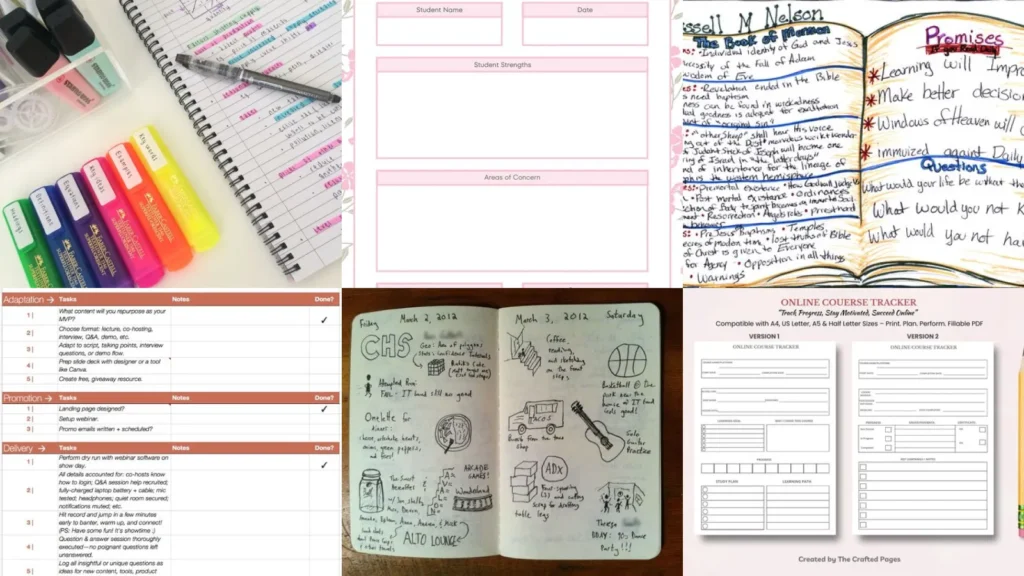
By the end of this list you’ll have a whole stack of layouts to steal for your next big event. No more scribbling on the back of a program, promise!
These got picked after scrolling through hundreds of pins looking for the ones that actually hold up. A layout is only good if you’ll still use it by session three, lol.
So the ones that made the cut are simple to copy, cheap to set up and genuinely useful once the coffee wears off.
Some of these are digital, some are pure paper and pen. A few live in a bullet journal, others print out in five minutes flat.
Grab whichever one matches how your brain actually works. There’s no wrong answer here!
Ready to actually remember what that keynote speaker said? Let’s get into it.
CONFERENCE NOTES IDEAS
Color Coded Conference Notes Layout
We’re starting off strong with a color coded layout. Each speaker gets their own color, so flipping back through the week actually makes sense.
Green for action items, orange for quotes, purple for random ideas that pop up mid session. It sounds fussy but it saves so much time later!
- Color makes it click
- Four highlighters do the whole job
- Works in any notebook you already own
Minimalist Conference Notes Spread
This minimalist spread strips everything down to three columns. Topic, takeaway, follow up. That’s it.
No decoration, no fuss, just clean lines that make scanning your notes on the plane home actually possible.
- Three columns, zero clutter
- Fits on one page per session
- Plain notebook works fine
Digital Conference Notes Template
Not much of a paper person? No problem there! A digital template keeps everything searchable, which matters a lot once you’re three conferences deep in a year.
Type it into a tablet app or a laptop doc and tag each session by topic. Searching later beats flipping through a stack of notebooks, every time.
- Search beats flipping pages
- Free templates for most note apps
- Syncs across your phone and laptop
Sketchnote Style Conference Summary
Sketchnoting turns a dry keynote into something you actually want to look back at. Little arrows, tiny icons, a few boxed quotes.
It looks intimidating but it really just takes some doodles and a willingness to draw a bad stick figure, haha! The messier ones are usually the most fun to revisit.
- Doodles beat a wall of text
- No drawing skill required
- A basic black pen does most of the work
Bullet Journal Conference Pages
Already keeping a bullet journal? Slide conference pages right in between your regular spreads. Same dot grid, same rapid logging shorthand you already use.
This one keeps everything in a single book instead of scattered across loose printouts.
- One notebook, no loose pages
- Uses your existing dot grid pages
- Rapid log keys carry over easily
Speaker Session Notes Layout
This layout is built around one speaker at a time. Name, topic, three key points and one big question you still have.
It forces you to actually pick the important things instead of writing down everything the speaker says word for word. Talk about talent for editing on the fly!
- One page, one speaker
- Room for a single follow up question
- Easy to skim the night after
Simple Webinar Notes Printable
Webinars move fast and the chat box is basically its own event. A simple printable keeps you from missing the good things while you’re typing questions.
Print a stack ahead of time. This webinar notes template ideas layout has a spot for the link, the date and three main takeaways, nothing more.
- Built for the chat box chaos
- Fits any webinar under two hours
- Space for the replay link too
Fillable Webinar Notes Template
A fillable version means you can type notes live without hunting for a printer first. Save it, fill it in on a tablet, done.
It keeps every webinar in the same format, so comparing notes from different sessions actually feels organized instead of chaotic.
- No printer needed at all
- Type directly on a phone or laptop
- Saves as a PDF when you finish
Weekly Learning Log Spread
A weekly learning log ideas spread is honestly one of the most satisfying pages to fill in. One box per day, a quick line about what you picked up.
It adds up fast. By month’s end you’ve got proof you actually learned something, not just a vague memory of trying to, lol!
- Small boxes, big payoff
- One page covers a full week
- Great for tracking podcasts or courses
Visual Learning Log Journal
This visual version trades lines of text for little icons and color blocks. It works great if you learn better from images than paragraphs.
Small drawings next to each entry make flipping back through old pages way more fun than reading dense notes ever was.
- Pictures instead of paragraphs
- Perfect for visual learners
- A few stickers make it even easier
Skill Tracker Bullet Journal Page
Trying to get better at something specific? A skill tracker ideas page breaks the goal into tiny check ins instead of one giant scary target.
Track practice hours, small wins, whatever counts as progress that week. Not that I’m competitive about my own tracker, haha!
- Big goals, tiny check ins
- Works for any hobby or job skill
- Weekly boxes keep it from feeling huge
Course Progress Tracker Printable
Last but definitely not least, a course completion tracker ideas printable for anyone juggling more than one online class at a time.
Mark off modules as you finish them and watch the progress bar fill in. There’s something oddly satisfying about coloring in that last little box!
- Watch the bar fill in
- Tracks up to six courses at once
- Print it fresh for every new class